WordPress vs. Wix, Squarespace, and GoDaddy: 5 Comparisons | Which Is Best for Your Business?
If you are comparing WordPress vs Wix, Squarespace, or GoDaddy for your business website, choosing the right platform is one of the most critical decisions you will make for your digital marketing strategy.
When evaluating WordPress vs Wix, Squarespace, and GoDaddy, choosing the right platform depends heavily on your business goals and technical needs.
Choosing the right platform for your business website is one of the most critical decisions you will make for your digital marketing strategy. In Palm Beach County’s competitive market—from Jupiter down to West Palm Beach—a slow, inflexible website can cost you valuable client inquiries, local search rankings, and thousands of dollars in lost revenue.
While DIY website builders promise quick setups and low upfront costs, growing businesses often hit performance and customization ceilings very quickly.
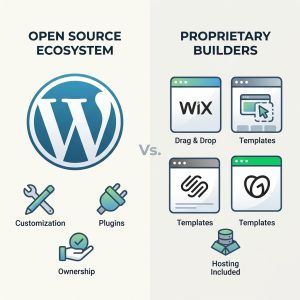
Below, we break down how custom WordPress setups compare against closed “Software-as-a-Service” (SaaS) website builders across five key categories: performance, SEO, cost, site ownership, and long-term scalability.
1. True Site Ownership vs. “Digital Renting”
The single biggest difference between WordPress and DIY website builders comes down to ownership.
-
Wix, Squarespace & GoDaddy: These are proprietary, closed platforms. You are essentially renting space on their infrastructure. You cannot export your site code, move your database to a faster hosting server, or transfer your design if the platform increases prices or discontinues features.
-
WordPress: WordPress is an open-source content management system (CMS). Your website files, databases, content, and design assets belong 100% to you. You can host your site anywhere, transfer hosting providers effortlessly, and customize every single line of code.
Key Takeaway: Building on proprietary site builders means building your digital presence on rented land. WordPress gives you full digital asset ownership.
2. Core Web Vitals, Speed & Google SEO
Analyzing WordPress vs Wix, Squarespace, and GoDaddy for search engine performance shows that open-source platforms offer superior optimization control. Search engines like Google prioritize fast, well-structured websites. Google’s Core Web Vitals measure real-world user experience, including loading speed, visual stability, and responsiveness.
-
Wix & Squarespace: Closed builders rely on standardized, heavy code frameworks designed to support millions of different template combinations. This unnecessary code bloat often leads to poor performance on mobile devices, slower loading times, and lower Core Web Vitals scores—directly hurting your local Google rankings.
-
WordPress: On a custom WordPress stack, every line of code can be streamlined. Paired with high-performance server architecture, server-level caching, and lightweight assets, a custom WordPress site routinely achieves near-perfect page speed scores.
3. Total Cost of Ownership
Many business owners choose DIY builders because the entry price seems low ($15 to $30 per month). However, the hidden costs add up quickly as your business grows:
-
 Base Monthly Fee:
-
DIY / SaaS Builders: $16 – $65+/month per site
-
Custom WordPress: Managed high-performance hosting included
-
-
Custom Features & Apps:
-
DIY / SaaS Builders: Paid monthly app subscriptions required
-
Custom WordPress: Open-source plugins & custom code flexibility
-
-
E-Commerce Transaction Fees:
-
DIY / SaaS Builders: Extra platform transaction fees on lower tiers
-
Custom WordPress: Standard payment processor fees only
-
-
Storage & Bandwidth:
-
DIY / SaaS Builders: Tiered resource limits requiring plan upgrades
-
Custom WordPress: Fully scalable server resources
-
Over 3 to 5 years, paying monthly platform subscription fees—plus required third-party app add-ons—frequently exceeds the investment of a custom-built, fully owned WordPress site.
4. Customization and E-Commerce Flexibility
Every business has unique operational needs—whether it’s booking appointments, collecting HOA association dues, or running an online store.
-
GoDaddy & Wix: You are restricted strictly to what the vendor’s app store provides. If you need a custom workflow, specialized booking system, or custom database integration, you are out of luck.
-
WordPress: Oofers unlimited flexibility. Whether you need an Ecwid-powered online store, a touch-free QR payment setup for custom billing, or tailored landing pages, WordPress can be adapted to fit any business model.
5. Platform Comparison Summary
“A central factor in comparing WordPress vs Wix, Squarespace, and GoDaddy is balancing ease of use against long-term site customization. Here is a quick snapshot of how each platform aligns with different business goals:
-
GoDaddy Website Builder: Best for basic, temporary 1-page business cards where SEO and branding are not priorities.
-
Squarespace: Good for visual portfolios or simple blogs, but restrictive for local service businesses requiring deep SEO strategy and speed optimization.
-
Wix: Accessible drag-and-drop design for hobbyists, but hindered by heavy code structures and platform lock-in.
-
Custom WordPress: The gold standard for local service providers, contractors, HOAs, and growing companies in South Florida that require speed, high Google rankings, custom features, and complete asset control.
Is It Time to Move Your Business to WordPress?
 Weighing WordPress vs Wix, Squarespace, and GoDaddy highlights why growing companies often outgrow simple drag-and-drop site builders.
If you are comparing different DIY site builders for your business website, choosing the right platform is one of the most critical decisions you will make for your digital marketing strategy.
At Web Design of Palm Beach, we offer specialized Website Migration Services for business owners in Jupiter, Tequesta, Palm Beach Gardens, and West Palm Beach. We safely transition your design, pages, and search authority over to high-performance WordPress infrastructure with zero downtime.
Need Help Choosing the Right Web Solution?
Explore our full range of Custom WordPress Services or contact us directly for a free site audit:
-
Call/Text: (561) 262-5886
-
Email: r.krausankas@gmail.com
-
Local Service Area: Jupiter, Tequesta, Palm Beach Gardens, West Palm Beach, and surrounding Palm Beach County, FL.